_Photo by Sai Kiran Anagani on _Unsplash
Note to self on how to get DOM content from Chrome Extension
As I was building a Chrome Extension, Easy GitHub to generate I had to get DOM content on a GitHub page to see if it's a forked page or not.
Easy GitHub is to display initially a way to sync forked repository with the master repository.
Reference Paul Seal's blog - How to keep your fork up to date with the master repository in GitHub
For forked GitHub page, GitHub page contains a meta tag named octolytics-dimension-repository_parent_nwo , which contains the parent repository the current repository is forked from.

But if the current page is not a fork repo page, then it doesn't have octolytics-dimension-repository_parent_nwo but have to use go-import meta value.
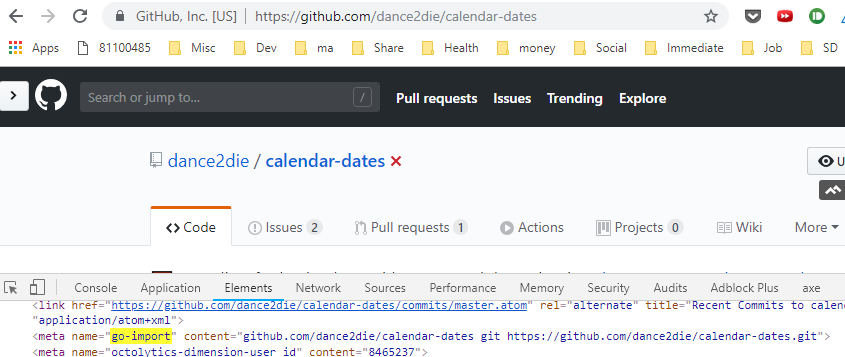
As a last resort, I needed to use window.location.href(or show a message that it's not a repo page in Chrome Extension popup).
When using document.getElementBy* or document.querySelector* within Chrome Extension, it fetches DOM for the extension HTML files, not from the tab content.
So to retrieve DOM content, one need to execute a script within a tab by sending a query (document.querySelector* or document.getElement*) like following.
| const code = `(function getUrls(){ | |
| const forkUrl = document.querySelector('meta[name="octolytics-dimension-repository_parent_nwo"]') | |
| ? document.querySelector('meta[name="octolytics-dimension-repository_parent_nwo"]').content | |
| : undefined; | |
| const url = document.querySelector('meta[name="go-import"]') | |
| ? document.querySelector('meta[name="go-import"]').content.split(' ')[0] | |
| : undefined; | |
| const href = window.location.href; | |
| return { forkUrl, url, href }; | |
| })()`; | |
| chrome.tabs.executeScript(tabId, { code }, function(result) { | |
| const { forkUrl, url, href } = result[0]; | |
| if (forkUrl) { | |
| document.getElementById("url").innerText = ` | |
| git remote add upstream https://github.com/${forkUrl} | |
| git fetch upstream | |
| git branch --set-upstream-to=upstream/master master`; | |
| } else if (url) { | |
| document.getElementById("url").innerText = ` | |
| git remote add upstream https://${url} | |
| git fetch upstream | |
| git branch --set-upstream-to=upstream/master master`; | |
| } else { | |
| document.getElementById("url").innerText = ` | |
| git remote add upstream ${href} | |
| git fetch upstream | |
| git branch --set-upstream-to=upstream/master master`; | |
| } | |
| }); |
Execute Script within a Tab to extract DOM content
Source code on GitHub.
You can see above that, you pass a code to query DOM elements and extract URLs, which you can use to create a git command script.
You can add a tabs permission to execute the script but it can be too detrimental thus you can simply add URLs to allow script executions.
| "permissions": [ | |
| "http://*/*", | |
| "https://*/*" | |
| ] |
"permissions" section in Chrome Extension manifest.json
Reference - Stack Overflow - chrome.tabs.executeScript not working?